CSS Box Model (Padding, Margin, Border)
What Is The Box Model?
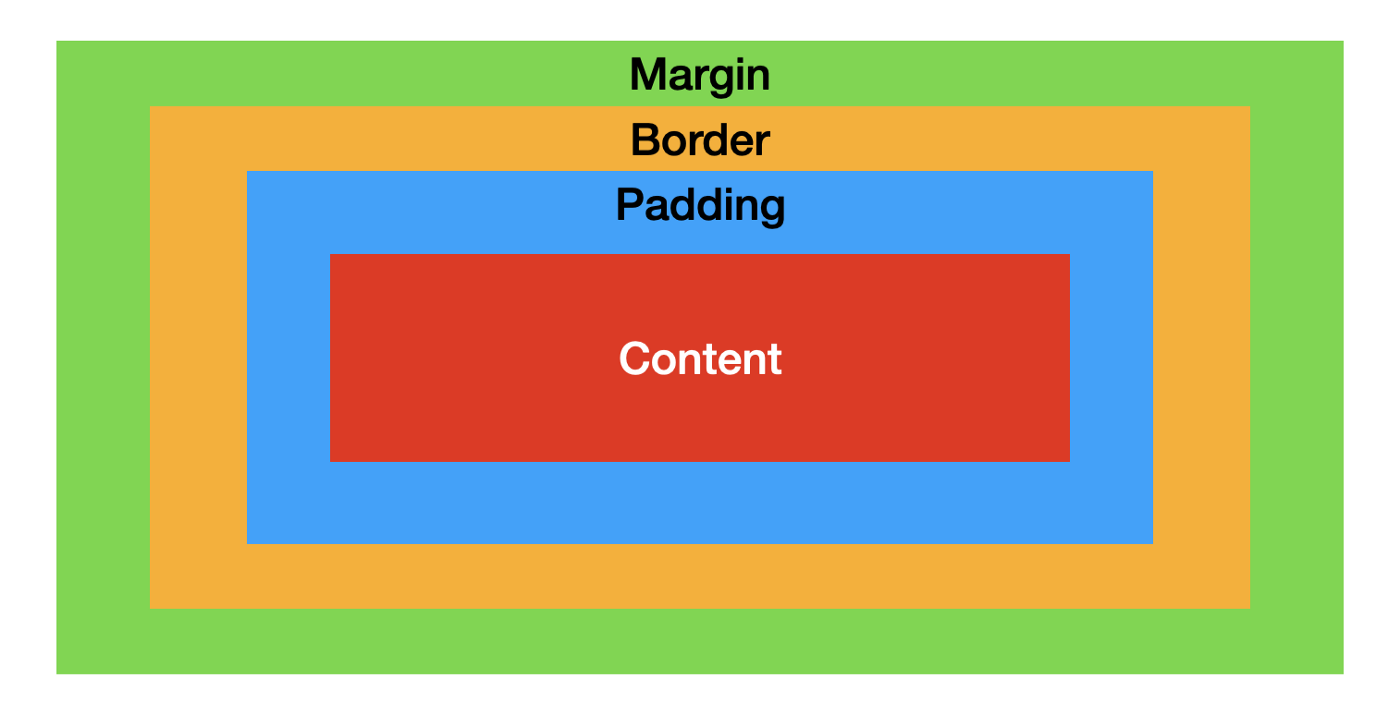
One incredibly important thing to understand about CSS is that everything is a rectangular box. Everything from text, to buttons, to inputs are represented by a box in CSS. Even if you draw a circle with CSS it will still be represented by a box when it is drawn on screen. This box is composed of multiple parts which in total make up the box model.
Content
The content of a box is everything inside the box. This is usually some form of text or a hard coded width and height. Below we have a simple div and everything with the red background color is the content of the box.
div {
  background-color: red;
  height: 100px;
  width: 200px;
}
Padding
The next portion of the box model is the padding and this comes directly outside the content. Padding allows you to add extra space to your element without making the content itself larger. It also maintains the background color of the element. This is perfect for when you need to add space between the edge of your background and your element content like with a button.
div {
  padding: 20px;
  background-color: red;
  height: 100px;
  width: 200px;
}
Border
The next layer of the box model is the border and the border is the layer that goes between the padding and the outside of the element. It is also the last part of the box model that contributes to the overall size of a box.
div {
  border: 30px solid blue;
  padding: 20px;
  background-color: red;
  height: 100px;
  width: 200px;
}
Margin
The final piece of the box model is margin. Margin is simply the space between different elements and occurs outside the border. Margin also does not contribute to the actual size of an element since it is outside the border.
div {
  margin: 20px;
  border: 30px solid blue;
  padding: 20px;
  background-color: red;
  height: 100px;
  width: 200px;
}


